SYS.BITDIVER // REV 3.0 STATUS: OPERATIONAL

Time-aware E2E testing. In YAML, not code.

Describe what should happen and when. BitDiver runs your testcases in parallel, waits for the right moment to the second, diffs the results with path-level ignores, and reports what broke — driven entirely by a YAML or JSON suite you can read in a review.

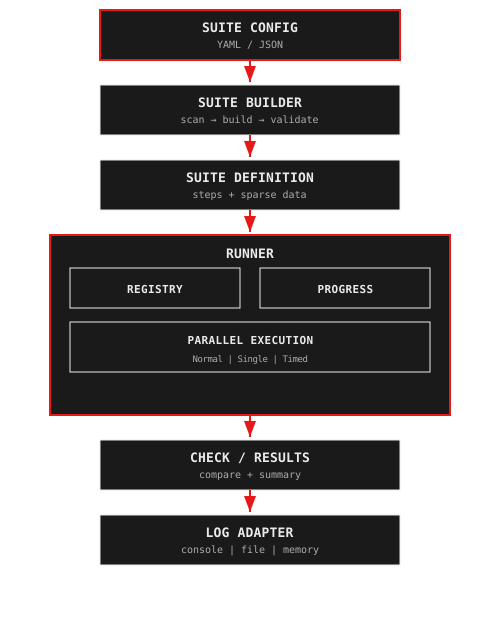
[ SYSTEM ARCHITECTURE ] BitDiver architecture diagram

What is BitDiver?

BitDiver turns regression testing into configuration. You write custom Steps once in TypeScript — send a request, mutate state, assert a response — and then compose them into suites declared in YAML or JSON. Adding a scenario means editing config, not shipping test code. The Runner owns the hard parts: it parallelises hundreds of testcases, fires timed Steps at an absolute offset from a reference point (not with flaky sleep()), swaps large testcase data to disk when memory matters, and deep-diffs the results against expected files with path-level ignores for system-generated fields. One TypeScript package, Zod-validated configuration, pluggable logging — battle-tested at Deutsche Bahn on production regression runs.

BitDiver pairs with its upstream companion Nanook — a spreadsheet-driven toolkit that turns equivalence-class tables in LibreOffice, Excel, or Google Sheets into the JSON testdata files the Runner consumes. Author scenarios in a spreadsheet, generate the data, let BitDiver execute and diff. Same author, same stack.

BUILT FOR /// SCENARIOS
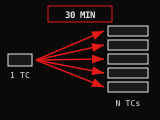
One testcase fanning into N testcases under the same 30-minute batch window

Batch processing under a 30-minute ceiling

Some pipelines process a file once every 30 minutes no matter how many records it holds. Testing them one record at a time means every run takes 30 minutes to prove nothing. BitDiver runs a thousand testcases through the same step-per-column so the whole suite finishes in one processing window — not a thousand.
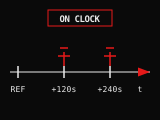
Timeline with events fired at +120s and +240s after a reference tick

Event simulation on a real clock

Systems that react to the world — rail signals, payment timeouts, scheduled transitions — can't be tested with sleep(). Declare timing.offsetSeconds on each Step and the Runner fires it at referenceTime + offset to the second. Flip testMode and every delay collapses to zero so the same suite runs in CI in seconds.

USE CASES /// 08 SCENARIOS
01

Batch-processing pipelines

Scheduled ETL jobs, file imports, or report generation where one processing window handles 1 to N records. BitDiver parallelises the verification so a thousand testcases fit in the same window as one.

BATCH / ETL
02

Event timing & signal simulation

Time-sensitive event streams — rail signals, IoT sensors, payment state machines — where events must fire at exact absolute offsets. Declare timing.offsetSeconds per Step and the Runner owns the clock.

TIMING / REALTIME
03

API regression & contract tests

Validate REST or GraphQL endpoints across hundreds of testcases. Path-level ignorePaths skip system-generated fields (IDs, timestamps) while real contract drift surfaces in details.json.

API / CONTRACT
04

Kafka & queue integration tests

Publish events, consume downstream, assert message order and payload shape. Runner-managed timing simulates producer–consumer gaps without sleep(); a StepSingle handles topic and consumer-group setup once per suite.

KAFKA / QUEUES
05

Database migration validation

Capture pre-migration state in a StepSingle, run the schema change, deep-diff post-state against expected fixtures. Path ignores skip auto-generated keys while catching real data anomalies.

DB / MIGRATION
06

Scheduled jobs & cron verification

Jobs that only fire at specific wall-clock moments (rollovers, report cutoffs, subscription renewals). Set offsetSeconds on the trigger Step, flip testMode for CI, and the same suite runs instantly locally and in production-time verification.

CRON / SCHEDULE
07

Multi-tenant & isolation tests

Run per-tenant testcases in parallel, each with isolated Run and Testcase environments. StepSingle handles shared setup, StepNormal handles per-tenant state — failures stay scoped to the tenant that broke.

MULTI-TENANT
08

Legacy-system regression

Wrap SOAP, mainframe protocols, or proprietary transports as custom Steps and compose them into suites in YAML alongside modern APIs. No plugin SDK to learn — if it's a TypeScript class, it's a Step.

LEGACY / SOAP
CORE MODULES /// 06 MODULES
Configuration icon

Config

Typed configuration you can trust in production. Define a Zod schema once and loadConfig() resolves values in priority order — env vars override inline values, which override the JSON file, which override schema defaults — so the same suite runs locally, in CI, and in staging without branches. Secret fields you declare are automatically masked in every log line.

MODULE / M-01
Suite builder icon

Suite Builder

Define suites in YAML, not in code. createSuiteFromConfig() assembles setup, timed, and teardown phases from one config file, then scans your testdata directories and auto-generates Steps from filenames like 120_kafka-event_payload.json. Adding a testcase is a drop-in, not a pull request against your test harness.

MODULE / M-02
Model icon

Model

Three Step types with zero ceremony. Extend StepNormal (once per testcase) or StepSingle (once per suite), then work against a typed tc or testcases getter — no stringly-typed context objects. When a testcase produces data too big to keep in memory, exportVars, loadVars, and loadTempVars swap it to disk between steps without changing your assertions.

MODULE / M-03
Runner icon

Runner Server

Parallelism that actually scales. In batch mode (the default) every testcase runs through step 1, then every testcase runs step 2 — so the step itself becomes the unit of concurrency, ideal for APIs that scale horizontally. Tune maxParallelSteps, hook live progress events, or flip testMode to collapse every delay for a fast CI run of the exact same suite.

MODULE / M-04
Check icon

Check

Diff what matters, ignore what doesn't. StepCheck walks expected and actual trees side-by-side and matches with Time, Number, Regex, and Contains directives for fields that shouldn't be equal literally. Path-level ignorePaths quietly drop system-generated values like message IDs, and every run emits summary.json plus details.json so failures are diffable in review.

MODULE / M-05
Log adapter icon

Log Adapter

Logs that survive the post-mortem. Four adapters — Console, ConsoleJson, File (one directory tree per Run/Testcase/Step), and Memory for assertions in tests — share a single structured format. Every error carries a source field identifying the testcase, step, and whether it was a StepSingle, so you stop grepping by timestamp.

MODULE / M-06
WORKFLOW /// HOW IT WORKS
01

Define Your Suite

Write a YAML or JSON suite config with three phases — setup, timed, teardown — plus a timing block that fixes the reference step and per-testcase delay. Drop your testdata files in per-testcase folders and timed file scanning turns filenames like 120_kafka-event.json into ordered Steps. No per-test boilerplate.

02

Register Your Steps

Subclass StepNormal or StepSingle, implement run(), and register the class in the StepRegistry under the name you used in the suite. Runner-managed timing steps are pre-registered, so typed step code is the only code you have to write.

03

Run Your Tests

Hand the suite, a log adapter, and a progress meter to the Runner. It parallelises the step grid, fires timed Steps at referenceTime + offsetSeconds, and streams status events as it goes. When it's done you get summary.json and details.json, plus a per-Run/Testcase/Step log tree for the ones that failed.

STEP TYPES /// EXECUTION UNITS
N

StepNormal

The workhorse: runs once per testcase. The typed tc getter hands you an EnvironmentTestcase with the step's declared data, a per-testcase map for state, and structured logging. Reach for it whenever you're sending a request, mutating per-TC state, or asserting a response.

TYPE / PER-TC
S

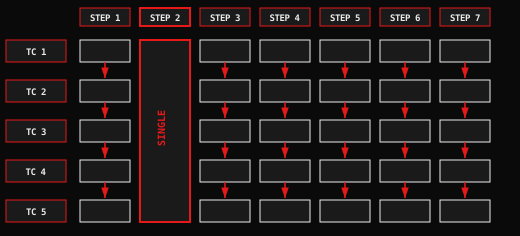
StepSingle

Grid showing a StepSingle as one tall cell spanning all five testcase rows, while other steps have one cell per testcase

Runs once for the whole suite, with a typed testcases getter exposing every testcase environment at once. Perfect for one-shot setup like clearing a database, seeding a shared fixture, or writing a cross-testcase teardown report — without inventing coordination primitives.

TYPE / PER-SUITE
T

Runner-Managed Timing

Write the Step as normal, declare timing.offsetSeconds on it in the suite, and the Runner waits until referenceTime + offset before firing — plus a configurable testcaseDelaySeconds spacing between testcases. Flip testMode: true for CI and every delay collapses to zero so the same suite runs in seconds.

TYPE / TIMED
EXECUTION /// MODES
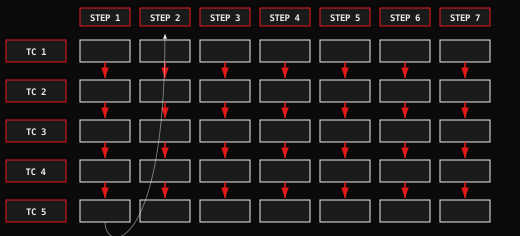
B

Batch Mode (Default)

Grid of 5 testcases by 7 steps with arrows going down each column, showing column-major execution order

Step-major execution. Every testcase runs step 1, then every testcase runs step 2 — making the step the unit of concurrency. It's the right default when your steps hit horizontally-scaled APIs and you want the fastest path through a wide suite.

MODE / COLUMN
R

Normal Mode

Testcase-major execution. Each testcase runs its full step pipeline end-to-end before the next begins — the right choice when state must be fully set up and torn down per testcase, or when steps share a session you can't interleave. Same suite file, different executionMode.

MODE / ROW
WHEN STEPS FAIL /// PROPAGATION
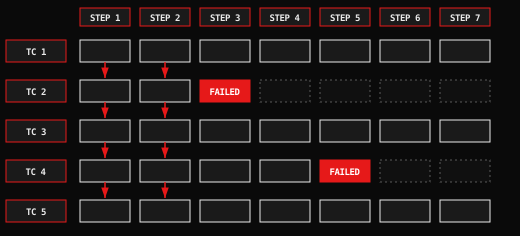
Grid showing two FAILED cells in red; downstream cells for those testcases are dashed to indicate they are skipped

Isolate or propagate — you pick at the Step type

When a StepNormal fails, only that testcase stops progressing. Its remaining Steps are skipped while every other testcase continues through the suite.

StepSingle failures are suite-level

A failing StepSingle is a shared fault: every testcase is reported failed from that column onwards. Reach for StepSingle when a failure should block the whole run (shared DB reset, cross-TC fixture), and StepNormal when failures should be isolated per testcase.

FAQ /// COMMON QUESTIONS
What is BitDiver?

BitDiver is an open-source E2E test framework that lets you keep test code small and test scenarios in configuration. You write custom Steps in TypeScript, then declare setup, timed, and teardown phases in YAML or JSON. The Runner parallelises testcases, fires timed Steps at absolute offsets from a reference point, and deep-diffs results — battle-tested at Deutsche Bahn on production regression runs.

How do Steps work?

Each Step instance goes through a fixed lifecycle — start() → beforeRun() → run() → afterRun() → end() — so you always know where to put initialisation, work, and cleanup. Extend StepNormal to run once per testcase, or StepSingle to run once for the whole suite with access to every testcase environment. Timing is not your problem: the Runner owns it through pre-registered steps (DetermineStartTime, CheckStartTime, Wait) and the timing.offsetSeconds you declare in the suite.

What are the execution modes?

Pick by what blocks what. Batch mode (the default) is step-major: every testcase runs step 1, then every testcase runs step 2 — ideal when steps hit horizontally-scaled services and the step itself is your concurrency unit. Normal mode is testcase-major: each testcase runs its full pipeline before the next begins — use it when per-testcase state must be torn down completely, or when steps share a non-interleavable session.

How do I write a custom Step?

Three lines, really: extend StepNormal or StepSingle, implement run(), and register the class in the StepRegistry under the name you used in the suite config. Inside run(), use the typed tc getter (per-testcase) or testcases getter (per-suite) for context and data — no stringly-typed globals. Timing and logging are already wired up, so your Step only contains the work.

How does configuration work?

You define a Zod schema and loadConfig() returns a typed, validated config plus a printable representation. Values resolve by priority — environment variables beat inline values, which beat the JSON file, which beats schema defaults — so the same suite runs locally, in CI, and in staging without code branches. Fields you declare as secrets are automatically masked everywhere the config is logged.

[ TRUSTED BY ]